Lennox S40 Smart Thermostat Review: Is It Worth Buying?
Are you thinking about a smarter way to control your home temperature? The Lennox S40 Smart Thermostat might be the answer you need. This device brings a sleek touchscreen and smart features to your wall.
Room by room customization is a standout feature here. You can set different temperatures for different spaces in your home. The thermostat also supports MATTER protocol, so it plays well with other smart devices.
Setup feels simple thanks to the intuitive interface. Many users praise how easy it is to get started. However, some reviews point to real concerns worth knowing about.
This review breaks down everything you need to know. We cover the good, the bad, and what it means for your home.
In a Nutshell
- Smart Away Mode uses GPS to adjust temperatures automatically when you leave home. This helps save energy without extra effort on your part.
- The thermostat supports 3 heat and 2 cool stages, giving you precise control over your HVAC system. It works with a standard 4 wire connection for most homes.
- MATTER protocol compatibility means this device can connect with a wide range of smart home platforms. You get flexibility beyond just Lennox systems.
- A photo display screensaver adds a personal touch to your thermostat. It turns a functional device into something more enjoyable to look at.
- User feedback shows mixed results. Ratings average around 3.4 out of 5 stars from hundreds of reviews.
- Some users report app crashes and reliability concerns. Clearing cache often fixes these issues temporarily.
- If you already own Lennox communicating systems, this thermostat integrates smoothly. That makes it a natural fit for existing Lennox households.
Key Features and Specifications
The Lennox S40 brings several standout capabilities to modern home climate control. Let’s explore what makes this unit tick and what you should know before deciding.
Touchscreen Display and Visual Appeal
The S40 features a bright, responsive touchscreen with adjustable brightness settings. You can customize how bright the display gets, which helps save energy during nighttime hours. The photo display screensaver function lets you add a personal touch—display family photos when the thermostat isn’t actively showing temperature data.
Smart Connectivity and Control
WiFi connectivity means you control your home temperature from anywhere using the mobile app. The device supports MATTER protocol compatibility, so it works with many smart home ecosystems beyond just Lennox products. You get full programmability, allowing you to set schedules that match your daily routine.
Climate Customization
The S40 handles 3 heat stages and 2 cool stages, giving you precise HVAC control. Room by room temperature customization stands out as a major feature. If different family members prefer different temperatures, you can adjust settings for specific areas of your home instead of relying on one central setting.
Smart Away Mode
The GPS based Smart Away Mode automatically adjusts temperatures when you leave home. You don’t need to manually switch modes—the thermostat detects when you’re gone and makes energy efficient adjustments on its own.
System Integration
If you already use Lennox communicating systems, this thermostat integrates smoothly into that ecosystem. The connection works through standard 4 wire setups, so installation fits most existing HVAC systems.
What Users Report
The intuitive interface makes initial setup straightforward for most homeowners. However, real world experiences show some concerns worth noting. The touchscreen illumination can cause temperature reading inaccuracies in certain situations. Additionally, some users report app reliability issues that occasionally require troubleshooting.
Understanding these features helps you decide if the S40 matches your home automation goals and climate control needs.

- Smart Wi-Fi thermostat with touchscreen control, featuring a fully programmable 7-day...
- ENERGY STAR certified for energy-efficient performance, helping reduce energy costs and...
Last update on 2026-09-01 / Affiliate links / Images from Amazon Product Advertising API
Design, Display, and User Interface
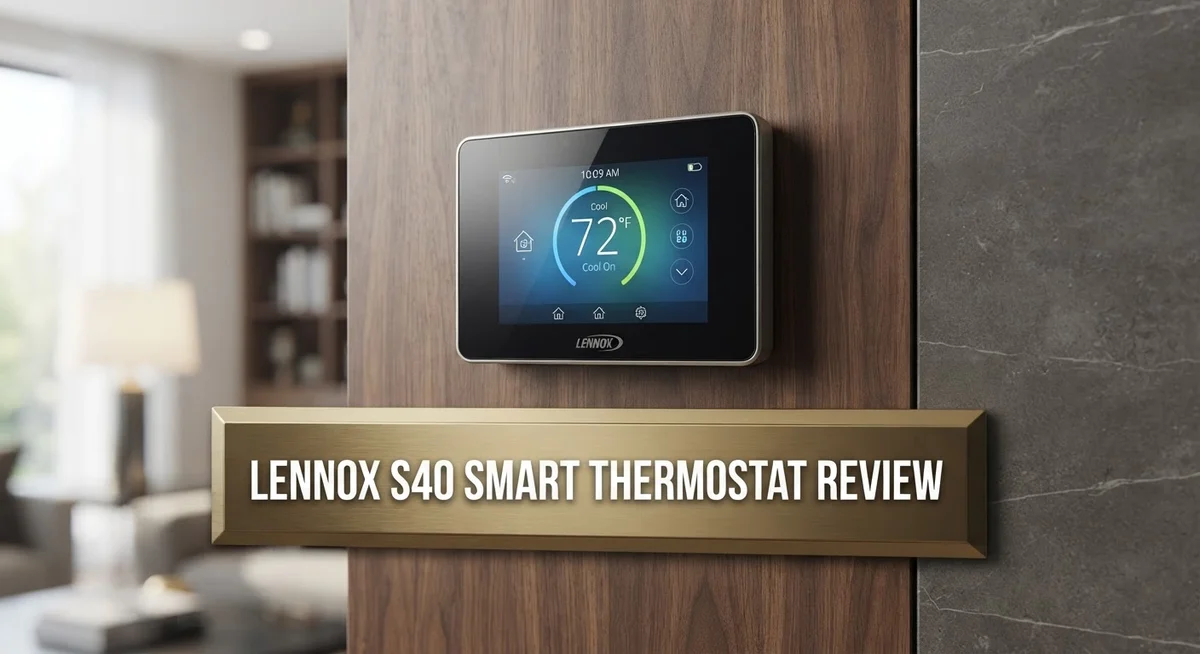
The S40’s touchscreen serves as your main control hub. You tap the display to adjust temperatures, set schedules, and access features. The screen responds quickly to your touch inputs, making navigation smooth and straightforward.
Brightness adjusts automatically based on your room’s lighting conditions. This prevents the screen from being too dim in daylight or too bright at night. You can also manually override this setting whenever you prefer.
The display quality matters because you interact with it daily. The S40 offers clear text and icons that are easy to read from across the room. The responsive interface means no lag when you’re making temperature changes.
One practical feature is the photo display screensaver. Instead of a blank screen, you can show personal photos when the thermostat isn’t actively being used. This adds personality to your wall while the device still monitors your home’s temperature.
The menu structure keeps things simple. You don’t need to dig through confusing submenus to find common functions. Most adjustments happen within one or two taps, which is helpful when you want quick changes.
The physical design feels modern and compact. It doesn’t dominate your wall space like older thermostats. The sleek appearance fits well with contemporary home decor.
Important note about the display: Some users have reported that temperature readings become inaccurate when the screen is illuminated. This is a known issue worth considering. The thermostat may display incorrect temperatures during active use, though readings stabilize when the display dims.
The mobile app mirrors the touchscreen interface. You get the same control options whether you’re at home or away. However, some users have experienced app crashes and occasional reliability problems, so your experience may vary.
Overall, the S40’s interface prioritizes ease of use. The touchscreen feels intuitive for most users, and setup doesn’t require technical expertise. The design looks good in any room, though the display accuracy issue deserves attention before you commit to this model.
Smart Home Integration and Connectivity
The Lennox S40 connects to your home network through WiFi, letting you manage temperatures from your smartphone or tablet. You can adjust settings anywhere, anytime, without being physically present at your thermostat.
MATTER protocol support opens doors to broader smart home compatibility. This means the S40 can communicate with devices and platforms beyond just Lennox equipment. Your thermostat becomes part of a larger ecosystem rather than standing alone.
If you already use Lennox communicating systems, the S40 slides into that setup seamlessly. The integration happens automatically without complex configuration steps. Existing Lennox users get immediate benefits from this compatibility.
The mobile app gives you room by room temperature customization. You can set different temperatures for different zones in your home. This feature helps you save energy by only heating or cooling spaces you’re actually using.
Smart Away Mode uses GPS technology to detect when you leave home. The thermostat automatically adjusts temperatures to conserve energy while you’re gone. When you return, it switches back to your preferred settings.
However, some users report app reliability problems. The application occasionally crashes or requires cache clearing to function properly. These issues can interrupt your remote control experience when you need it most.
The touchscreen interface displays your settings clearly and responds quickly to touches. You can see your current temperature, humidity levels, and system status at a glance. The adjustable brightness means you can read it comfortably in any lighting condition.
Connection setup takes just a few minutes if you follow the instructions. The WiFi pairing process is straightforward for most users. Once connected, your thermostat syncs with the Lennox servers to enable remote features.
One important consideration: Some users have noticed temperature readings become less accurate when the display screen is illuminated. This design flaw affects how reliably the thermostat measures actual room temperature during normal use. You should verify readings with a separate thermometer if precision matters for your home.
The S40 prioritizes convenience and integration over standalone operation. It works best when combined with other smart home devices and Lennox equipment.
Top 3 Alternatives
Nest Learning Thermostat

- Nest’s smartest, most advanced thermostat yet, the Google Nest Learning Thermostat (4th...
- Savings you can count on: The Nest Learning Thermostat can help save up to 31% on heating...
Last update on 2026-08-31 / Affiliate links / Images from Amazon Product Advertising API
The Nest Learning Thermostat learns your schedule and adjusts temperatures automatically. This device remembers your preferences and creates a custom heating and cooling plan over time. You control it from your phone anywhere, anytime.
Nest uses motion sensors to detect when nobody is home. The thermostat then enters Eco mode to save energy. You get detailed reports showing how much energy you use each month.
Ecobee SmartThermostat

- Save up to 23% every year on heating and cooling costs, adjusts to your set schedule to...
- Compatible with 85% of systems, check your system’s compatibility with our online ecobee...

Last update on 2026-09-01 / Affiliate links / Images from Amazon Product Advertising API
Ecobee’s system comes with a remote sensor that detects temperature in different rooms. The thermostat balances comfort across your entire home instead of just one area. This prevents hot and cold spots.
Voice control works through Alexa built right into the device. You can ask it to change the temperature without lifting a finger. The app gives you real-time alerts if something seems wrong with your heating or cooling system.
Honeywell Home T9

- Non-Programmable
- Large, Clear, Backlit Display
Last update on 2026-08-31 / Affiliate links / Images from Amazon Product Advertising API
The Honeywell Home T9 includes a smart remote sensor for bedroom temperature control. It keeps your sleeping area at the perfect temperature while you sleep. The system learns when you’re away and adjusts accordingly.
Geofencing technology detects when family members leave or arrive home. The thermostat automatically switches between heating and cooling modes based on weather forecasts. You get energy reports and can set different schedules for weekdays and weekends.
All three alternatives offer smartphone control and energy savings features. Each one learns your habits and adjusts temperatures without manual input. Choose based on whether you prioritize room-by-room control, voice commands, or geofencing technology.
Energy Efficiency and Temperature Control
The Lennox S40 delivers solid energy efficiency through its automatic temperature adjustments and room-by-room customization features. You can set different temperatures for each space in your home, which means you’re not cooling or heating areas you’re not using.
Smart Away Mode works with GPS technology to detect when nobody is home. The thermostat then automatically shifts to energy-saving settings, reducing unnecessary heating or cooling while you’re away. This feature helps lower your monthly energy consumption without requiring manual adjustments.
The 3 heat stages and 2 cool stages give you precise control over your HVAC system. Your heating and cooling runs only as much as needed to reach your target temperature. This staged approach prevents your system from working harder than necessary.
Temperature control accuracy matters for energy efficiency, but here’s an important concern. Some users report inaccurate temperature readings when the display screen is illuminated. This flaw can cause your system to run longer than needed or miss comfort targets. Inaccurate readings directly impact how efficiently your thermostat manages your home’s climate.
The mobile app lets you monitor and adjust temperatures remotely from anywhere. You can make changes before arriving home or respond to unexpected weather changes instantly. However, some users experience app reliability issues like crashes or freezing, which can interrupt your ability to manage energy settings effectively.
The touchscreen display includes adjustable brightness that adapts to room lighting conditions. This feature reduces unnecessary power drain from a constantly bright screen. The photo display screensaver adds visual appeal while consuming minimal energy.
Integration with existing Lennox communicating systems enhances overall efficiency. Your thermostat communicates with compatible HVAC equipment to optimize performance. This coordination ensures your heating and cooling work together smoothly without wasting energy through miscommunication.
The S40’s energy management features work best when the display accuracy stays reliable. Before purchasing, consider that temperature reading issues could undermine your efficiency gains and require workarounds or professional service calls.
Installation and Compatibility
The Lennox S40 works with standard 4-wire thermostat connections, making installation straightforward for most homes. If your HVAC system uses conventional wiring, you won’t need special adapters or rewiring.
WiFi connectivity is built into the S40. You connect it to your home network during setup, and the process takes just a few minutes through the touchscreen menu. The device then communicates with Lennox’s cloud servers to enable remote access.
Compatibility with existing Lennox systems is a major advantage. If you already own a Lennox communicating HVAC unit, the S40 integrates seamlessly. Your system recognizes the thermostat automatically, and you gain access to advanced features like zone control and system diagnostics.
The S40 also supports the MATTER protocol. This opens compatibility with other smart home brands beyond Lennox. You can control your thermostat through multiple ecosystems if you use different platforms in your home.
One important consideration is your home’s wiring setup. The S40 requires a C-wire (common wire) for full functionality. If your home lacks a C-wire, you may need an adapter or power extender. Check your existing thermostat wiring before purchasing to avoid installation delays.
Installation typically takes 30 to 60 minutes for someone with basic handyman skills. The touchscreen walks you through each step with clear instructions. If you’re uncomfortable working with electrical wiring, hiring an HVAC technician is a safer option.
The mobile app setup happens after the thermostat is installed. You download the Lennox app, create an account, and add your thermostat. This process links your S40 to your smartphone or tablet for remote control.
Compatibility extends to voice assistants through MATTER support. You can potentially control the S40 using voice commands if your smart home hub supports MATTER devices. However, direct voice control availability depends on your specific ecosystem setup.
Before installation, verify that your HVAC system matches the S40’s requirements. Check your current thermostat to confirm wire types and stage counts. This quick check prevents installation problems and ensures the S40 works at full capacity in your home.
Pros and Cons
Pros
- Touchscreen interface is intuitive and responds quickly to your touches
- Room-by-room temperature customization lets you control comfort in different areas
- Smart Away Mode uses GPS to automatically adjust settings when you leave home
- MATTER protocol support connects the S40 to a wider range of smart home devices
- Integrates seamlessly with existing Lennox communicating HVAC systems
Cons
- Temperature readings become inaccurate when the display is illuminated, which affects comfort control
- Mobile app experiences reliability issues including crashes and requires frequent cache clearing
- User reviews average 3.4 out of 5 stars, reflecting widespread concerns about dependability
- Some owners report persistent reliability problems that impact long-term satisfaction
Who Should Buy It
The Lennox S40 works best for homeowners who already use Lennox communicating HVAC systems. If you have a compatible Lennox unit, this thermostat becomes a natural upgrade that enhances your existing setup.
You should consider the S40 if you value room-by-room temperature control. Different family members prefer different comfort levels, and this thermostat lets you customize temperatures in separate zones throughout your home.
The S40 suits people who want remote temperature management. The mobile app gives you control from anywhere, whether you’re at work or traveling. You can monitor your home’s climate without being physically present.
If you appreciate smart home integration, this thermostat offers MATTER protocol compatibility. This means it connects with various smart devices and voice assistants beyond just Lennox products. Your thermostat becomes part of a larger connected home ecosystem.
Homeowners with standard 4-wire thermostat connections should find installation straightforward. If your current setup uses this common wiring configuration, the S40 fits without major modifications. Basic handyman skills typically suffice for the installation process.
The S40 appeals to energy-conscious households. Automatic adjustments help reduce unnecessary HVAC operation, which can lower utility bills over time. Smart Away Mode adds to these savings by adjusting settings when nobody is home.
However, you should avoid the S40 if reliability concerns worry you. User reviews average 3.4 out of 5 stars, and reported issues include inaccurate temperature readings when the display is lit and app crashes. These problems suggest potential frustration with daily use.
Skip this model if you need a thermostat that works independently from Lennox systems. The S40 performs best when paired with compatible Lennox equipment. Standalone use may limit its full capabilities.
The S40 isn’t ideal for renters or people who move frequently. Installation requires some setup, and you benefit most from long-term use. If you plan to stay in your home for several years and want enhanced climate control, the S40 becomes more worthwhile.
Final Verdict
The Lennox S40 stands out as a capable smart thermostat with a lot to offer. It brings genuine comfort control and smart features to your home. Still, no thermostat is perfect, and this one has its share of quirks.
Software glitches remain a real concern for many users. Lennox has released updates over time, but some issues persist. It helps to check for the latest firmware before you commit fully.
If you’re new to smart thermostats, the learning curve here is gentle. The screen guides you well, and most people adapt quickly. This makes the S40 a friendly pick for first time smart home users.
Customer support experience varies widely based on reviews. Some users report quick fixes, while others struggle with unresolved problems. Your results may depend on your local HVAC technician’s familiarity with Lennox systems.
For households already invested in the Lennox ecosystem, this thermostat feels like a natural extension. It ties your heating and cooling together in one smart hub. This kind of integration is hard to replicate with third party thermostats.
Long term reliability is still a question mark for many buyers. The average rating reflects mixed experiences rather than a clear consensus. It’s wise to read recent reviews before making your final call.
Energy savings from automatic adjustments can add up over time. This benefit matters most to households that leave temperatures unmanaged otherwise. The Smart Away feature alone can make a noticeable difference.
In short, the S40 rewards patience and the right setup. It shines brightest within a Lennox powered home. For everyone else, it’s worth weighing the software concerns carefully before choosing this thermostat as your daily comfort partner.
Frequently Asked Questions
Does the Lennox S40 work with non-Lennox HVAC systems?
The S40 connects best to Lennox communicating systems. If you own a different brand of HVAC equipment, you may face compatibility issues. The thermostat uses a standard 4-wire connection, so basic installation is possible. However, you won’t access advanced features like system integration without a Lennox unit.
Contact your HVAC technician before purchasing if you use another brand. They can confirm whether the S40 will function properly with your existing setup.
Can I control the S40 from my phone when I’m away?
Yes, the mobile app lets you adjust temperature remotely. You can change settings from anywhere using WiFi connectivity. The Smart Away Mode feature also kicks in automatically when you leave home, using GPS to optimize your settings.
Keep in mind that some users report app crashes and occasional freezing. Clearing the app cache often fixes these problems temporarily.
What causes the temperature reading errors?
The display brightness creates a known issue with sensor accuracy. When the screen is illuminated, temperature readings become unreliable. This flaw affects your comfort control because the thermostat responds to incorrect data.
Lennox has not released a permanent fix for this design problem. You may need to work around it by adjusting display settings or relying on manual overrides.
Is the S40 easy to set up?
The touchscreen interface is intuitive and straightforward. Most homeowners can complete installation themselves if they have a standard 4-wire connection. The setup process guides you through each step clearly.
Professional installation remains an option if you prefer expert help.