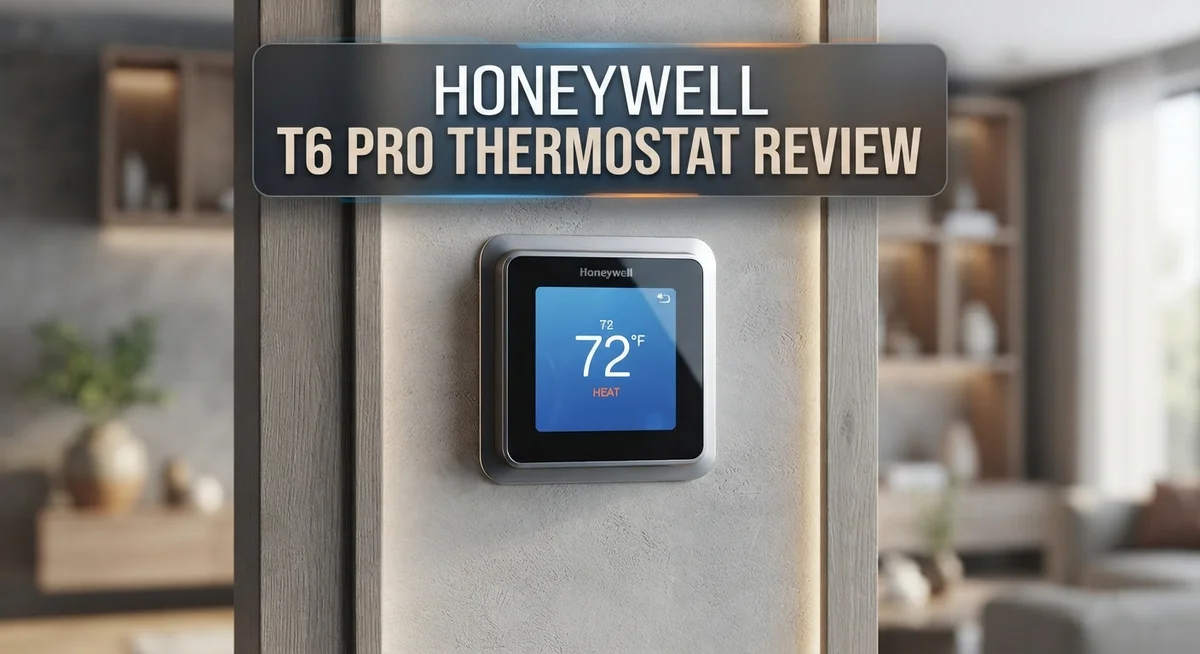
Honeywell T6 Pro Thermostat Review: Should You Buy This?
Are you thinking about upgrading your home thermostat? The Honeywell T6 Pro might be the answer you need.
This smart thermostat brings comfort and control to your fingertips. It features a simple touchscreen display that anyone can use.
You get WiFi connectivity right out of the box. This means you can adjust your home temperature from anywhere using your phone.
The T6 Pro also supports geofencing technology. It detects when you leave home and adjusts settings automatically to save energy.
Smart home lovers will appreciate the integration options. This thermostat works well with Google Assistant and Apple HomeKit.
It also learns your comfort preferences over time. The device adapts to your lifestyle without constant manual input.
This thermostat holds an ENERGY STAR certification. That label signals real potential for lower energy bills.
But is it perfect for every home? Some users report issues with compatibility and cycling.
In this review, we break down every feature. We also share real pros and cons so you can decide if the T6 Pro fits your home.
In a Nutshell
Here’s a quick summary of what the Honeywell T6 Pro offers:
-
Touchscreen display makes daily use simple. You can adjust settings with just a few taps.
-
It supports multi-stage systems. This includes 3 Heat/2 Cool for heat pumps or 2 Heat/2 Cool for conventional setups.
-
You get remote control access for programming. This means you can change settings from anywhere.
-
Some users noticed higher energy bills after installing this thermostat. Others report the A/C cycles too often.
-
Compatibility issues show up with certain HVAC systems. Check your system type before buying.
-
A few users mention reliability concerns in online forums. These are worth checking before you decide.
The Honeywell T6 Pro combines smart features with easy controls. It works well for many homes, but not all setups are a perfect match. Weigh the pros and cons based on your specific system.
Key Features and Specifications
The Honeywell T6 Pro puts advanced climate control into your hands with a straightforward design. Its touchscreen display responds quickly to your touch, making temperature adjustments feel natural and intuitive.
This thermostat handles multiple heating and cooling stages. You can run it with 3 heating stages and 2 cooling stages on heat pump systems, or 2 heating and 2 cooling stages on conventional units. This flexibility means it works with many different HVAC setups in homes across various climates.
WiFi connectivity lets you manage your home temperature from anywhere. Your smartphone becomes your thermostat’s remote control. You check the current temperature while at work or adjust settings before you arrive home.
The geofencing feature adds another layer of convenience. Your thermostat knows when you leave and when you return. It automatically switches between comfort and away modes based on your phone’s location, so you never waste energy heating or cooling an empty house.
Smart home integration makes this device fit seamlessly into your connected home. It works with Google Assistant and Apple HomeKit, so you can control it with voice commands. You can also create automation routines that trigger temperature changes based on other smart home events.
Learning capability sets this model apart from basic programmable thermostats. The T6 Pro observes your temperature preferences over time and adjusts schedules automatically. It adapts to your lifestyle without requiring constant manual updates.
The ENERGY STAR certification signals that this thermostat meets strict efficiency standards set by the EPA. Many homeowners appreciate this badge as proof of environmental responsibility.
Installation remains simple for most users. The straightforward wiring process and clear instructions mean you can often complete setup without professional help. The interface guides you through initial configuration step by step.
These specifications create a thermostat that balances smart features with ease of use. Whether you want basic scheduling or advanced automation, the T6 Pro delivers the tools you need for comfortable home climate control.

- Hvac/Thermostats & Accessories
- Made in: United States
Last update on 2026-10-22 / Affiliate links / Images from Amazon Product Advertising API
Smart Home Integration and Control
The T6 Pro shines when it comes to connecting with your smart home ecosystem. Google Assistant and Apple HomeKit compatibility make voice control a real option. You can ask your smart speaker to adjust the temperature without lifting a finger.
The touchscreen interface feels intuitive once you get started. Buttons respond quickly, and menus stay simple. You won’t need to dig through confusing settings to find what you want.
Remote access through the mobile app lets you check your home’s temperature from anywhere. Whether you’re at work or on vacation, adjustments take just a few taps. This feature gives you peace of mind when you’re away from home for extended periods.
Geofencing technology automatically detects when you leave and when you arrive. Your thermostat learns your patterns and adjusts settings without manual input. This hands-free approach appeals to busy households that want automation without complexity.
The learning capability sets this model apart from basic programmable units. Over time, the thermostat picks up on your comfort preferences and temperature adjustments. It adapts to your lifestyle rather than forcing you into rigid schedules.
Installation connects easily to your existing WiFi network. The setup process takes minutes for most users. Once online, the thermostat syncs with your smart home platform of choice.
However, integration isn’t always seamless. Some users report that certain HVAC systems don’t play well with the T6 Pro’s smart features. Compatibility checks matter before you purchase. Verify that your current system works with this model to avoid frustration.
The reliability of remote connections varies based on your home’s WiFi strength. Weak signals can cause delays or disconnections. A solid WiFi setup ensures the app responds quickly to your commands.
Overall, the T6 Pro delivers solid smart home integration for most households. Its compatibility with major platforms and straightforward app design make it accessible. Just confirm your system matches before buying to avoid compatibility headaches.
Installation and Ease of Use
Installing the Honeywell T6 Pro takes minimal effort. Most users complete the setup in under an hour without calling a professional. The device connects directly to your existing HVAC wiring, so you won’t need special tools or extensive knowledge.
The touchscreen interface guides you through each step. Buttons are large and clearly labeled. Text appears in a readable size. You navigate menus using simple taps and swipes. The display responds quickly to your touch inputs.
WiFi setup happens right after you mount the thermostat. You enter your network name and password through the screen. The device connects and syncs with the Honeywell app on your phone. This process typically takes two to three minutes.
The learning capability means you don’t need to program complex schedules manually. The thermostat observes your habits over the first week. It adjusts temperatures based on when you’re home or away. You can still override settings anytime you want.
Geofencing adds convenience without extra work. Your phone’s location tells the thermostat when you’re leaving. The system automatically switches to away mode. When you approach home, it returns to your preferred temperature. This happens silently in the background.
Remote control through the mobile app feels straightforward. The app shows your current temperature and humidity levels. You tap buttons to raise or lower the temperature. You can also view your heating and cooling history. The interface matches the thermostat’s on screen design.
However, some users report WiFi connection issues. Weak signals in certain homes cause delays or disconnections. Reconnecting requires entering your password again. This frustration typically happens in homes far from the router.
Compatibility requires checking before you buy. The T6 Pro works with most conventional systems and heat pumps. Some older HVAC setups don’t communicate properly with this model. Contact Honeywell support with your system details to verify compatibility.
Overall, installation and daily use feel accessible to most homeowners. The touchscreen keeps things simple. The app extends control to your phone. Setup takes minimal time. The main challenge involves ensuring your HVAC system matches what this thermostat requires.
Top 3 Alternatives
Ecobee SmartThermostat

- Save up to 23% every year on heating and cooling costs, adjusts to your set schedule to...
- Compatible with 85% of systems, check your system’s compatibility with our online ecobee...

Last update on 2026-10-22 / Affiliate links / Images from Amazon Product Advertising API
The Ecobee SmartThermostat offers voice control through Alexa built right into the device. You get a touchscreen that responds quickly to your commands. The app lets you adjust temperature from anywhere using your phone.
This unit learns your schedule over time. It also shows you energy usage reports so you understand where heat and cooling go. Installation takes about 30 minutes for most homes.
Nest Learning Thermostat

- Nest’s smartest, most advanced thermostat yet, the Google Nest Learning Thermostat (4th...
- Savings you can count on: The Nest Learning Thermostat can help save up to 31% on heating...
Last update on 2026-10-22 / Affiliate links / Images from Amazon Product Advertising API
Google’s Nest learns your habits automatically. You set it once, and it adjusts itself based on when you’re home or away. The sleek design fits modern homes perfectly.
The Nest app sends you alerts if something seems wrong. It works with other Google devices for a connected home experience. The display shows weather and time along with temperature settings.
Emerson Sensi Smart

- PRIVACY PROTECTION*: Sensi won’t sell your personal information to third parties
- EASY DIY INSTALLATION: Use the built-in level and step-by-step app instructions for a...
Last update on 2026-10-22 / Affiliate links / Images from Amazon Product Advertising API
Emerson Sensi gives you simple setup without professional help needed. The touchscreen is easy to read from across the room. You control everything through the mobile app or voice commands.
This thermostat tracks your energy usage weekly. It works with most HVAC systems in residential homes. The geofencing feature turns your system on or off based on your location.
Each option brings different strengths. Ecobee excels with built-in Alexa support. Nest shines with automatic learning. Sensi keeps things straightforward and affordable. Your choice depends on what matters most—smart home integration, automatic learning, or simple operation.
Energy Efficiency and Savings Potential
The Honeywell T6 Pro offers real potential for cutting your heating and cooling costs. ENERGY STAR certification means this unit meets strict efficiency standards from the EPA. You get measurable energy savings when you use the thermostat’s smart features consistently.
The geofencing technology works as your first money saver. The thermostat detects when you leave home and adjusts temperatures automatically. When you return, it restores your comfort settings without delay. This prevents heating or cooling empty rooms, which drains energy fast.
The learning capability adapts to your daily patterns over time. Instead of guessing your ideal temperature schedule, the thermostat learns when you need warmth or cooling. This reduces unnecessary cycles and keeps your HVAC system running only when needed.
Multi stage heating and cooling support means your system runs efficiently at different load levels. Your furnace or air conditioner doesn’t always run at full power. The thermostat matches output to actual demand, which saves energy throughout the year.
Remote control through the mobile app lets you make adjustments from anywhere. You can lower heating before you arrive home or reduce cooling during cooler afternoons. These small changes add up to meaningful savings over months and seasons.
However, some users report unexpected energy increases after installation. A few owners noticed their air conditioning cycles excessively. These cases suggest installation quality or system compatibility issues matter. Proper setup by a qualified technician helps avoid these problems.
The touchscreen interface makes it easy to adjust settings without confusion. You won’t accidentally leave your system running in wasteful modes. Clear feedback on the display helps you monitor what your thermostat is doing.
Real savings depend on your current setup and habits. If you upgrade from a basic manual thermostat, expect noticeable reductions. If you already have an older programmable unit, improvements may be smaller. The key is using the geofencing and learning features actively. Most homeowners see 10 to 15 percent energy savings within the first few months of operation.
Geofencing and Learning Capabilities
Geofencing acts as your thermostat’s awareness system. The T6 Pro detects when you leave your home and automatically switches to away mode. Your heating or cooling adjusts to conserve energy while nobody is there.
When you approach home, the system recognizes your arrival. It returns to your comfort settings before you walk through the door. This happens without you lifting a finger.
The geofencing feature uses your smartphone’s location data. Your phone communicates with the thermostat through your home’s WiFi network. The system learns your typical schedule over time.
Learning capability makes the T6 Pro different from standard programmable thermostats. Instead of you creating complex schedules, the device observes your patterns. It notices when you wake up, leave for work, and return home.
After two to three weeks of use, the thermostat starts adjusting automatically. It remembers your preferred temperature for mornings, afternoons, and evenings. The system adapts as your routine changes seasonally.
Both features work together to save energy. Geofencing prevents heating or cooling empty rooms. Learning capability ensures your comfort settings match your actual lifestyle, not a generic schedule.
Some users find the geofencing works reliably in most conditions. Your home’s WiFi strength affects how quickly the system responds. Weaker signals may cause slight delays in temperature adjustments.
The learning function requires patience during its initial setup period. You’ll see better results after the thermostat gathers enough data about your habits. The system becomes smarter the longer you use it.
One consideration: geofencing depends on smartphone location services. If you disable location access on your phone, the feature stops working. You’ll need to manually switch modes or use the mobile app instead.
The combination of geofencing and learning creates a hands-off experience. You spend less time thinking about temperature control. Your home stays comfortable while using less energy than fixed schedules typically allow.
Pros and Cons
Pros
- Touchscreen display guides you through setup and daily adjustments with minimal confusion
- Smart home integration works seamlessly with Google Assistant and Apple HomeKit
- Multi stage heating and cooling support keeps your system running efficiently across different load levels
- Remote control through the mobile app lets you adjust settings from anywhere in your home
- ENERGY STAR certification signals the thermostat meets strict efficiency standards
Cons
- Some users report unexpected energy increases after installation rather than savings
- A/C cycles excessively for certain users, causing discomfort and potential efficiency loss
- Compatibility limitations mean you must verify your heating and cooling system before you buy
- Reliability concerns appear in user forums, suggesting inconsistent performance for some homeowners
Who Should Buy It
The Honeywell T6 Pro works best for homeowners who want smart climate control without steep learning curves. If you value simplicity, this thermostat speaks your language.
You should buy this model if you own a multi stage heating and cooling system. The T6 Pro supports 3 heat and 2 cool stages for heat pumps, or 2 heat and 2 cool for conventional systems. Your HVAC equipment runs at the right capacity for current weather conditions, which keeps efficiency high.
Smart home enthusiasts find real value here. Google Assistant and Apple HomeKit integration means you control your thermostat through voice commands or your existing smart home ecosystem. No need to learn a separate app or system.
Homeowners who travel frequently benefit from geofencing and remote access. Your smartphone location triggers automatic adjustments when you leave or arrive home. The mobile app lets you change settings from your office, your car, or anywhere with internet access.
The touchscreen interface appeals to people who dislike complicated menus. Setup takes minutes rather than hours. Daily adjustments feel intuitive and straightforward.
However, pause before buying if you have specific concerns. Some users report higher energy bills after installation rather than lower ones. A few experience excessive air conditioning cycles that create comfort issues. Before purchasing, check that your HVAC system matches the T6 Pro’s compatibility requirements. Review user forums specific to your heating and cooling setup.
The learning capability requires patience during the first two to three weeks. If you need immediate results, this feature might frustrate you initially.
Skip this model if you prefer traditional programmable thermostats without WiFi connectivity. The T6 Pro’s value depends on using its smart features. If you never check your phone or use voice commands, you miss key benefits.
Bottom line: Buy the T6 Pro if you want a user friendly smart thermostat with geofencing, learning capabilities, and smart home integration. Avoid it if you’ve heard reliability concerns from users with your exact HVAC configuration or if you experience energy bill increases in similar setups.
Final Verdict
The Honeywell T6 Pro stands out as a solid choice for smart climate control. It combines simple design with helpful features like geofencing and learning capability.
This thermostat suits most modern households well. It works best for people who want convenience without complicated setup steps.
Before you decide, check your system compatibility carefully. Multi stage heating and cooling systems get the most benefit from this device.
Some users face energy usage concerns after installation. These issues seem tied to specific home setups rather than the thermostat itself.
Reliability varies across different homes and systems. Your experience may differ based on your HVAC setup and internet connection strength.
The touchscreen interface remains a strong selling point. It makes daily use simple for anyone, regardless of tech experience.
Smart home integration adds real value for connected households. Google Assistant and Apple HomeKit users will find this feature especially useful.
Think about your daily routine before buying. Frequent travelers benefit most from remote access and automatic adjustments.
Homeowners who prefer simple, manual thermostats might want to look elsewhere. This model works best for those ready to embrace smart technology.
Patience matters during the first few weeks. The learning function needs time to understand your preferences accurately.
Overall, the Honeywell T6 Pro delivers strong performance for the right household. It shines brightest in homes with compatible systems and reliable WiFi connections.
Weigh the pros and cons based on your specific needs. Consider your current system type and your comfort with smart technology.
This thermostat represents a solid step into smart home climate control. It offers genuine convenience for those willing to adjust during the initial learning period.
Your final decision should reflect your comfort level with technology and your specific home setup requirements.
Frequently Asked Questions
Does the Honeywell T6 Pro work with heat pump systems?
Yes, it does. The thermostat supports multi stage heating and cooling for heat pump setups. It handles 3 heat stages and 2 cooling stages on heat pump systems. You should verify your specific heat pump model in the compatibility checklist before installation.
Can I control this thermostat away from home?
Absolutely. The mobile app gives you remote access to adjust temperature settings from anywhere. Geofencing technology automatically detects when you leave and return home. Your system adjusts settings automatically based on your location. This feature works well for people who travel frequently or have unpredictable schedules.
Will this thermostat learn my preferences?
The T6 Pro includes learning capability for your comfort patterns. It requires patience during the first two to three weeks. The system observes your temperature adjustments and schedules. After this period, it adapts to your habits. Keep in mind that results vary depending on your usage patterns and how consistent your routine is.
What smart home platforms does it support?
The thermostat connects with Google Assistant and Apple HomeKit. You can give voice commands to adjust your temperature. Integration works smoothly with most modern smart home setups. Check your specific devices before purchase to confirm compatibility with your existing ecosystem.
Should I expect lower energy bills after installing it?
Some users report significant energy savings. However, others have experienced unexpected increases in energy usage after installation. Results depend on your system type, home insulation, and how you use the thermostat. Monitor your bills for the first month to see how it affects your home.